Empty Start Page in Vivaldi
Some Vivaldi users may experience an empty page when starting the browser, even though TablissNG works correctly on new tabs.
The Problem
This is a known issue (somebody reported it on my GitHub already #92) specifically affecting how Vivaldi handles extension-controlled start pages on initial launch.
The Solution (Workaround)
To fix this, you can manually set your homepage to the TablissNG extension page:
-
Open Vivaldi Settings.
-
Go to General > Homepage.
-
Select Specific Page.
-
Enter the following URL:
chrome-extension://dlaogejjiafeobgofajdlkkhjlignalk/index.html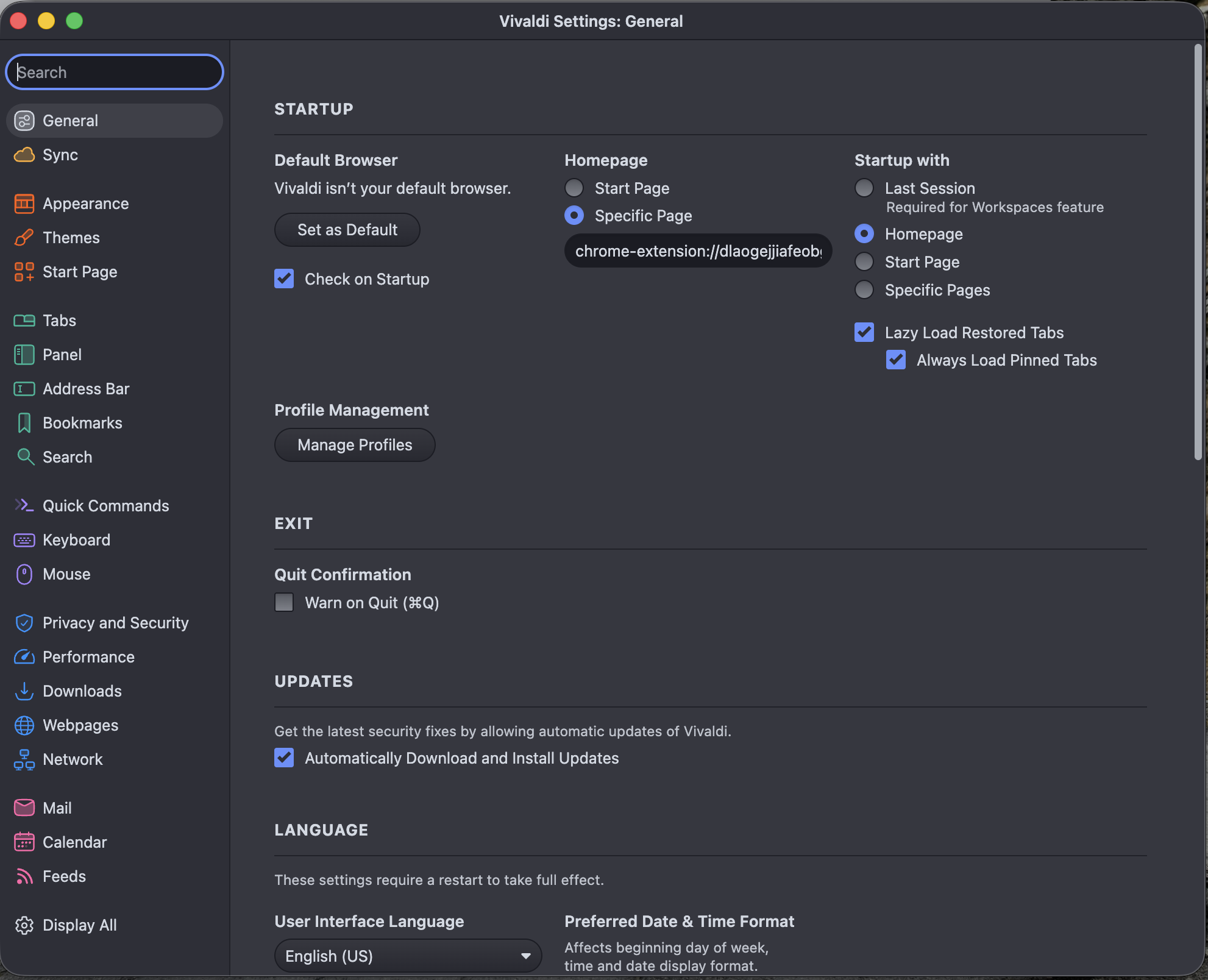
-
Under Startup with, ensure it is set to Homepage.
Now, when you start Vivaldi or click the Home button, TablissNG will load correctly.
:::info key included in manifest
A key is included in the manifest primarily for ease of testing the Trello widget. The key makes the extension install with the same ID every time like it does on Firefox, even when manually installing it. This is also why everybody will be able to specify the same chrome-extension:// URL.
:::